

 Open Proteus
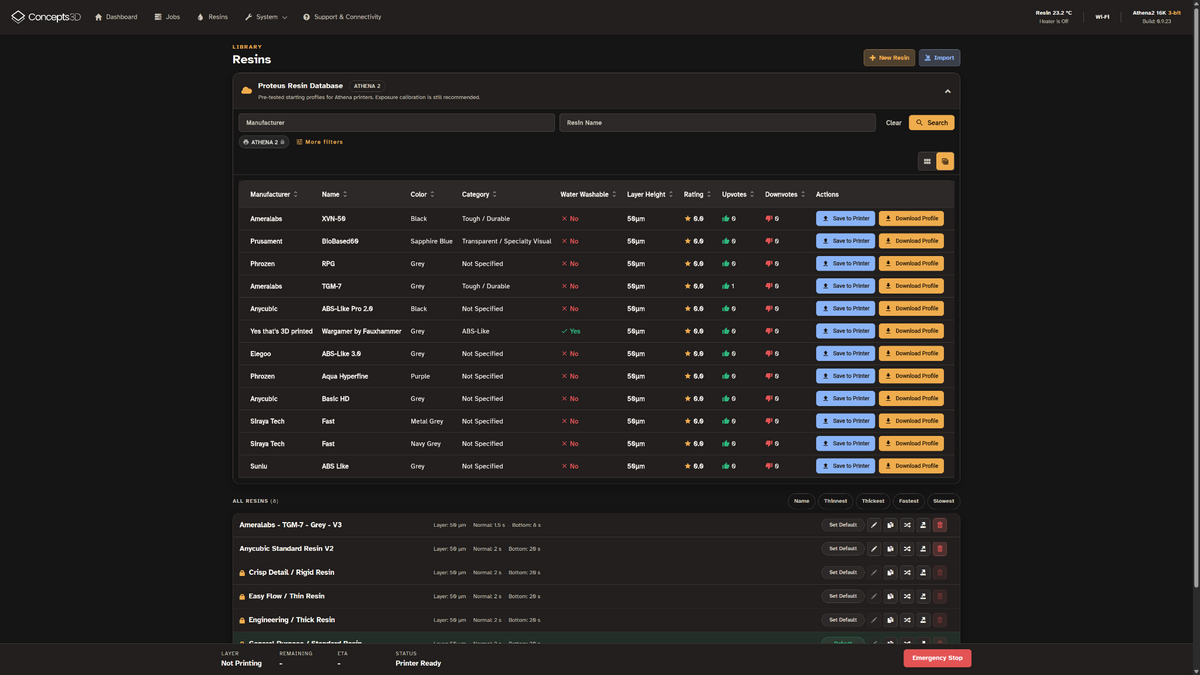
Proteus Resin Database
Find a better starting point for your next resin. Proteus brings manufacturer-derived and community-contributed resin profiles together, with settings adapted for Athena II and a practical path to calibration.
Find a starting point. Make it yours.
Browse compatible materials, save a profile and refine it for your own printer and resin.

Browse resin profiles
Search a growing collection of resin materials and manufacturer profiles instead of starting from scratch.

Athena II starting settings
Review exposure and printing parameters that have been adapted for Athena II hardware.

Save and fine-tune
Save a selected profile through the Athena WebUI, then adjust and calibrate it for your setup.


From database to dependable prints
Start by finding the correct resin and a compatible Athena II profile in Proteus. Save it through the WebUI and review the settings before printing a small calibration model.
Profiles are starting points, not universal guarantees. Resin age, pigment, wavelength, temperature, vat film, and machine setup can affect results. We strongly recommend exposure calibration for every new resin.
Where the profiles come from
A growing library of useful starting settings, with control over the final result.
Manufacturer-derived profiles
Starting parameters based on published material information and adapted for Athena II. They still need validation on your printer.
Community contributions
Explore profiles shared by other users, and contribute your own settings as the database grows.
Your tuned resin profiles
Use Proteus to get started, then save and refine the settings that work best for your resin and printing conditions.
Ready to find your resin?
Search Proteus for a suitable starting profile, then bring those settings into Athena II and calibrate them for your next print.